Prelaunch preview. Explore AROS products and skills. Checkout is in sandbox; no real payment.
Sector 01 · AI Tools

Reproduce results. Reuse the method.

Scientific workflows that AI can assemble and researchers can inspect, adapt and reuse.

This is our design goal. Supported agent interfaces, workflow editing and review features vary by tool and release; consult each tool’s capability and release record.

Bringing a scientific method into a new project often means repeating the same work: understanding documentation, configuring software, writing code and checking results. Nexitia’s goal is to preserve that effort in reusable tools, together with the knowledge needed to use them.

Commercial plans and pilot fees are being validated. Catalog prices are indicative; availability and license terms are specific to each package. Commercial checkout is not open.

  • MCP + CLI + SKILL contract
  • Human-auditable GUI
  • Distributed directly by the lab

CohortDAG installation example

bash
css agent install --target claude-code
css doctor

For CohortDAG, this command registers the MCP server and installs the skill; the doctor checks the environment. Other tools have their own installation instructions and supported operations.

CohortDAG example: adopting a tool with the MCP + CLI contract

  1. 1

    Install & register

    One command hooks the tool into your agent: MCP server plus a skill that teaches the workflow.

  2. 2

    Self-check

    A doctor command diagnoses the environment and prints exact fixes — the agent verifies before it works.

  3. 3

    The agent works

    It authors, validates, compiles and runs pipelines headlessly through the tool's own engine.

  4. 4

    A human audits

    CohortDAG stores supported workflow results in a portable session file for inspection in its GUI. Review the release record for tested save and reopen behavior.

The catalog

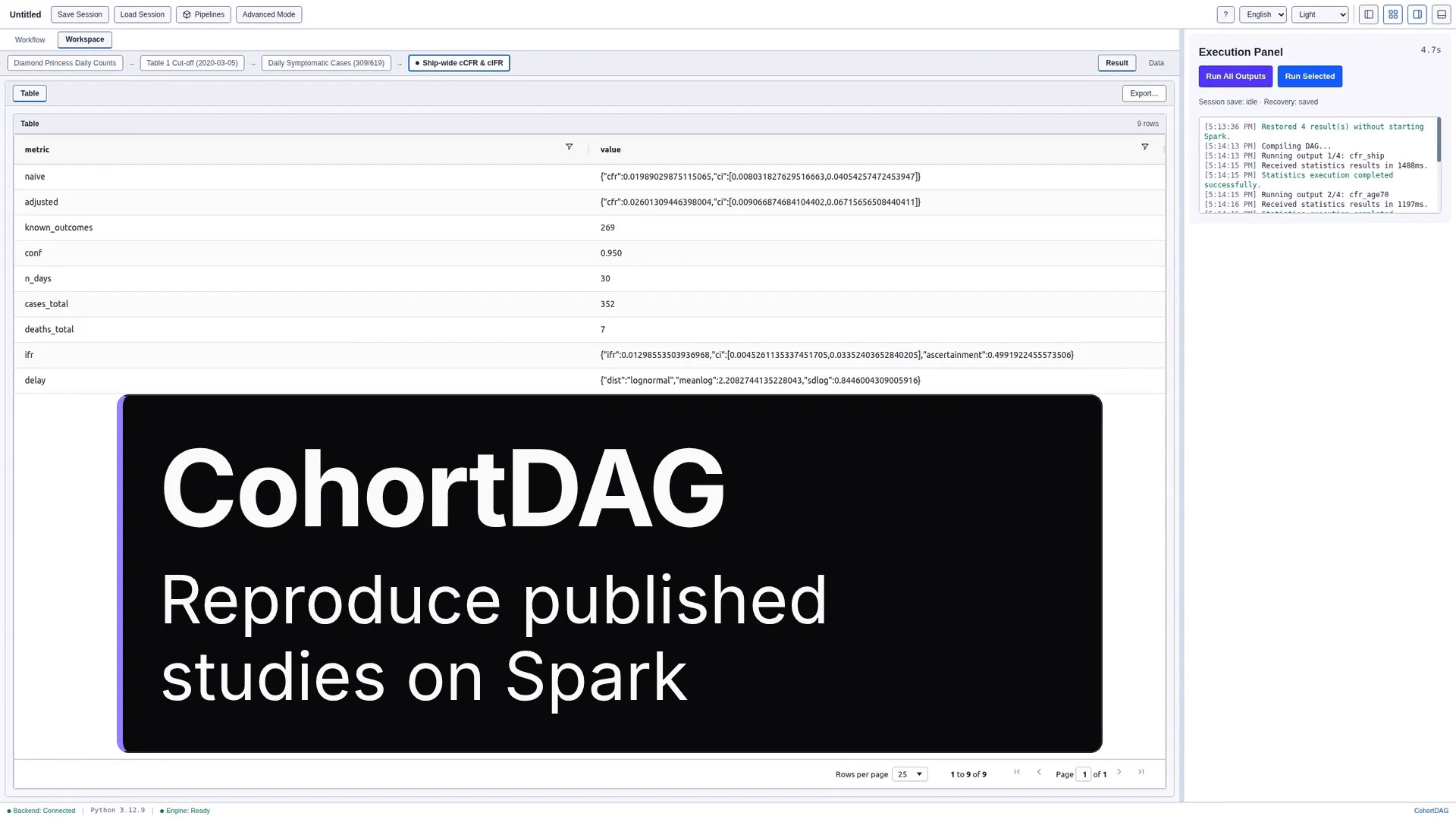
CohortDAG: Reproduce published studies on Spark

CohortDAG

MCP · CLI · SKILL · GUI · BY LABONOM

A desktop visual workflow editor for clinical big-data analysis on Apache Spark. Researchers connect data sources, filters, joins and statistics nodes on a canvas; the compiler emits Spark SQL, the hybrid statistics engine produces Table 1, Kaplan-Meier curves, Cox models and epidemiological measures, and everything saves into a portable .csp session that reopens with results intact.

  • 27 node types
  • Survival & epi statistics
  • 18 MCP tools
  • EN / JA

Windows · macOS · Linux — Electron · Python · Apache Spark

BetaPricing on request
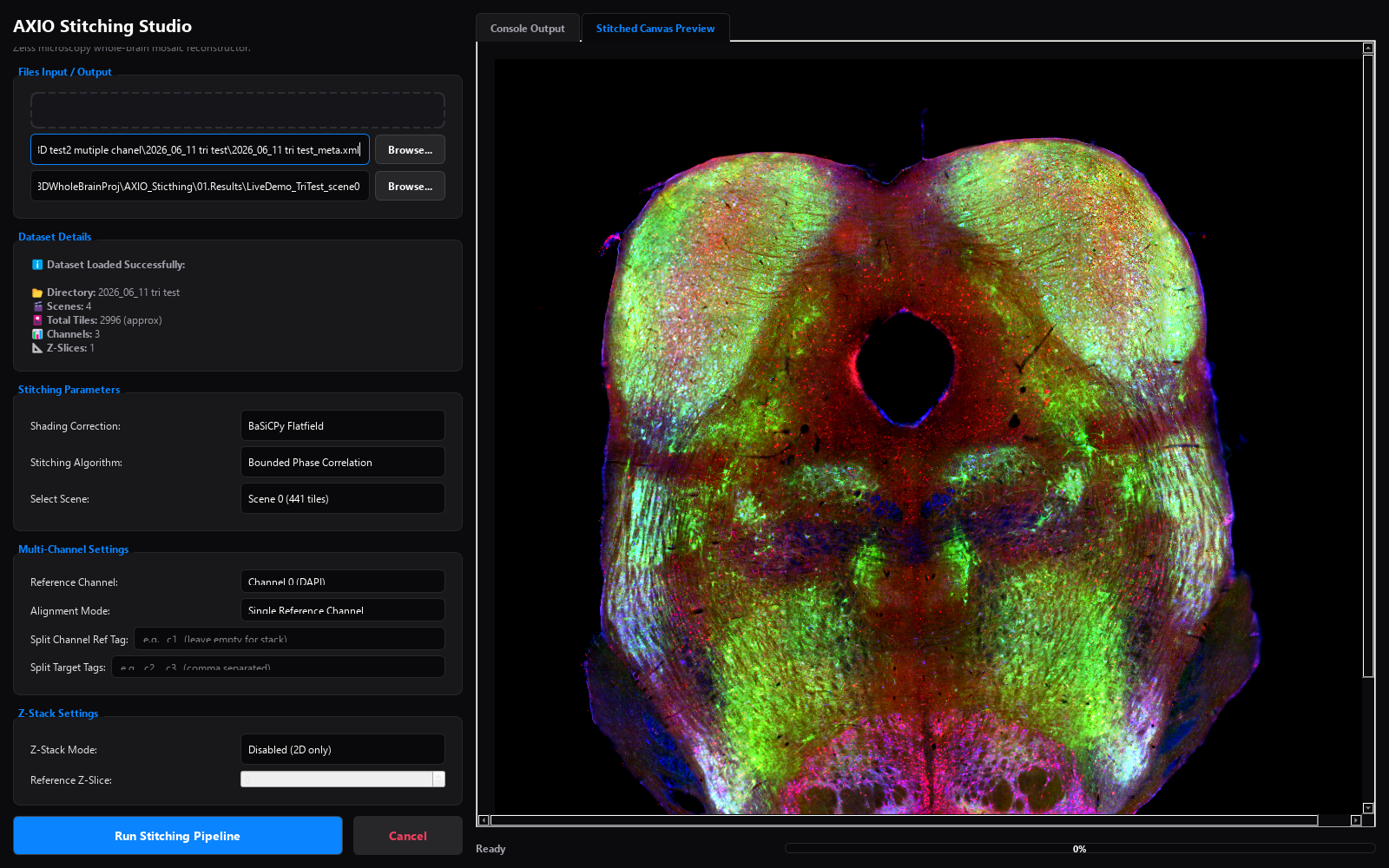
AXIO Stitching Studio dark-themed window showing a stitched triple-fluorescence brainstem section — DAPI blue, FITC green, Rhodamine red — in the Stitched Canvas Preview tab; dataset details read 4 scenes, 2,996 tiles, 3 channels, with BaSiCPy flatfield and bounded phase correlation selected

AXIO Stitching Studio

MCP · CLI · SKILL · GUI · BY LABONOM

A high-throughput tile-scan stitcher for microscopy — Zeiss and vendor-neutral. It auto-detects five input formats, applies BaSiCPy flatfield (or median/spatial) shading correction, registers tiles by bounded phase correlation or SIFT with a Tikhonov-anchored global solve — or by pure stage coordinates — and feather-blends everything into 16-bit ImageJ-compatible TIFF mosaics. The same engine ships as a PySide6 desktop app, an axio CLI, and an MCP server with 17 typed tools, so both human and agent workflows use the same implementation.

  • 17 MCP tools
  • 5 auto-detected input formats
  • Multi-channel & Z-stacks
  • 3-channel fluorescence, live

Windows · macOS · Linux — PySide6 · Python

ShippingFree · MIT
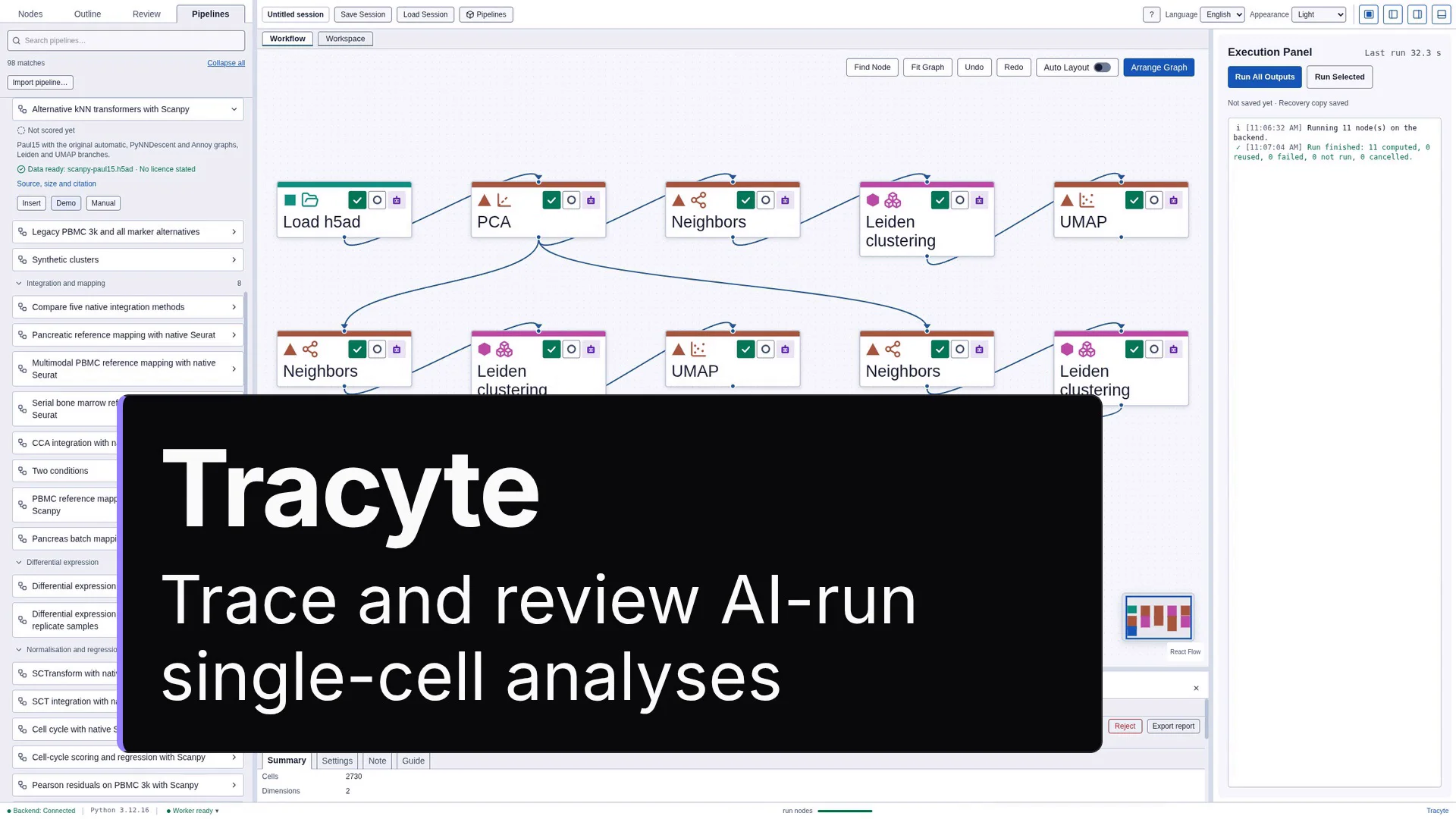
Tracyte: Trace and review AI-run single-cell analyses

Tracyte

MCP · CLI · SKILL · GUI · BY LABONOM

A desktop application in which a human traces, reviews, modifies and annotates an AI-run single-cell RNA-seq analysis. It is the successor of the SCRIB Shiny app and an AI-native tool: agents author and inspect analyses through its MCP server, CLI and installable skills, and every change they make is attributed and, against an open window, consent-gated. The GUI frame and node-tree system derive from CohortDAG. It runs single-cell analyses from counts to labelled clusters on a validated node graph, with the Workspace, the Embedding Explorer and each step's code beside its settings. It is published for Linux (x64 .deb and AppImage) as 0.2.13, for Windows (x64 installer) as 0.2.4 and for Apple Silicon Macs as 0.2.3. The documentation and tutorial videos are made on Linux 0.2.12.

  • Single-cell RNA-seq
  • Human decisions recorded
  • Agent changes consent-gated
  • Linux 0.2.13 · Windows 0.2.4 · macOS 0.2.3

Windows · macOS · Linux — Electron · Python (scanpy, AnnData)

Technical previewTechnical preview · Linux 0.2.13 · Windows 0.2.4 · macOS 0.2.3 · $20 USD per month per workspace

From a reference result to a reusable workflow

Our development approach is to preserve both the tested method and the knowledge needed to use it. Each tool’s release record identifies what has been implemented and checked.

  1. 01

    Define and reproduce

    We start with published analyses, official software tutorials and methods developed in research. Using established scientific software, AI helps implement the procedure and reproduce defined reference results. We compare the outputs, review the implementation and record what has been verified, under which conditions and what remains unresolved.

  2. 02

    Preserve the tested method

    The tested implementation becomes a versioned workflow component. Its code stays fixed within that version, while researchers supply their own data and supported parameters. Each component carries instructions for AI, its scientific context, requirements and verification record.

  3. 03

    Compose and inspect

    Where supported by the selected tool and release, researchers can ask AI to assemble compatible components into a visible workflow. They can inspect the supported data, code, settings and outputs, understand the choices made, and revise the analysis.

New questions sometimes require new methods. Where supported by the selected tool and release, researchers can add custom code or AI steps for clearly defined tasks. Our design goal is to make each step’s validation status visible, so researchers can decide where AI reasons, where tested software executes and where human review is required.

Reproducing a reference establishes agreement within a defined scope. Applying the method to new data or combining components still requires appropriate checks and scientific judgment. Capabilities, verification evidence and release availability are documented separately for each tool.

Our aim is to reduce repeated coding, token use, debugging and setup while making the analysis easier to understand. As researchers review and improve their workflows, useful methods and lessons can become resources for future projects.

Planned Core integration

The knowledge your agent needs, when it needs it.

Core has existing memory and retrieval implementations. The complete discovery workflow described here, including local model selection and coverage across tools, remains in development. Each release’s records describe its tested capabilities and limitations.

The planned Core integration is designed to help your AI agent discover relevant tools and receive the skills and scientific context needed for the task. It aims to reduce manual context management by revealing useful detail as the work progresses.

In this design, each tool would provide a versioned set of skills and scientific context. Core would organize these resources by field and workflow similarity, with cross-links for shared methods. A small local language model would help interpret requests and select relevant material for the user’s agent.

  1. 01

    Discover

    Start with compact descriptions of candidate tools and workflows.

  2. 02

    Select

    Review inputs, scientific assumptions, requirements and what has been verified.

  3. 03

    Execute

    Load the selected operation’s instructions, supported parameters and checks.

  4. 04

    Investigate

    Open detailed methods, code, references and troubleshooting when needed.

This planned flow follows progressive disclosure: supply useful detail as the task develops. Essential constraints must be available before action. The integration must let researchers inspect the selected context and its sources, and must check permissions, versions and input compatibility in software.

Read the design, tested capabilities and limitations
Skill LibraryPipeline WorkshopMCP Endpoint