CohortDAG
Draw a clinical analysis as a flowchart; a deterministic compiler turns it into Spark SQL and runs it — and your AI agent can author the whole pipeline for you.
- Versions shown by platform
- Windows · macOS · Linux
- Electron · Python · Apache Spark
- Release dates shown below
Download CohortDAG
Self-hosted from nexitia.ai. Each link is a private, time-limited download for your workspace.
Before you install — assisted runtime setup
- Windows x64 for the qualified rc20 Windows build
- macOS 15 or later on Apple Silicon for the qualified rc20 Mac build; Intel Macs are unsupported
- x64 Linux; rc20 qualified on Ubuntu 22.04; Debian and Ubuntu support assisted repair through apt-get and desktop authorization
- Internet access during first-run runtime setup
- Approximately 2 GB of free space for the isolated analysis environment
On macOS, CohortDAG reuses compatible native Python 3.12 and Java 17 installations or, with your permission, obtains pinned native builds directly from their upstream projects into your user application-support directory. The default path does not require Homebrew, administrator access, or shell-profile edits.
On Windows, use the setup EXE. If the backend environment is incomplete, choose Repair automatically, wait for the repair receipt, then choose Retry Backend. The repair button is shown only while a supported repair step remains.
On Debian or Ubuntu Linux, install the x64 DEB or run the x64 AppImage. If the backend is incomplete, choose Repair automatically. CohortDAG uses apt-get through pkexec; your desktop authorization service may request administrator approval, and CohortDAG never sees your administrator password. On distributions without apt-get and pkexec, use the manual commands shown in the setup window.
You need an internet connection during first-run setup. After setup, analysis can run locally without a network connection. Python, Temurin, Apache Spark, and the other analysis packages remain under their own upstream licences and are not embedded in the installer.
Updates are manual for this release. Check this page for updates, download the replacement for your architecture, and verify its SHA-256 before installing it.
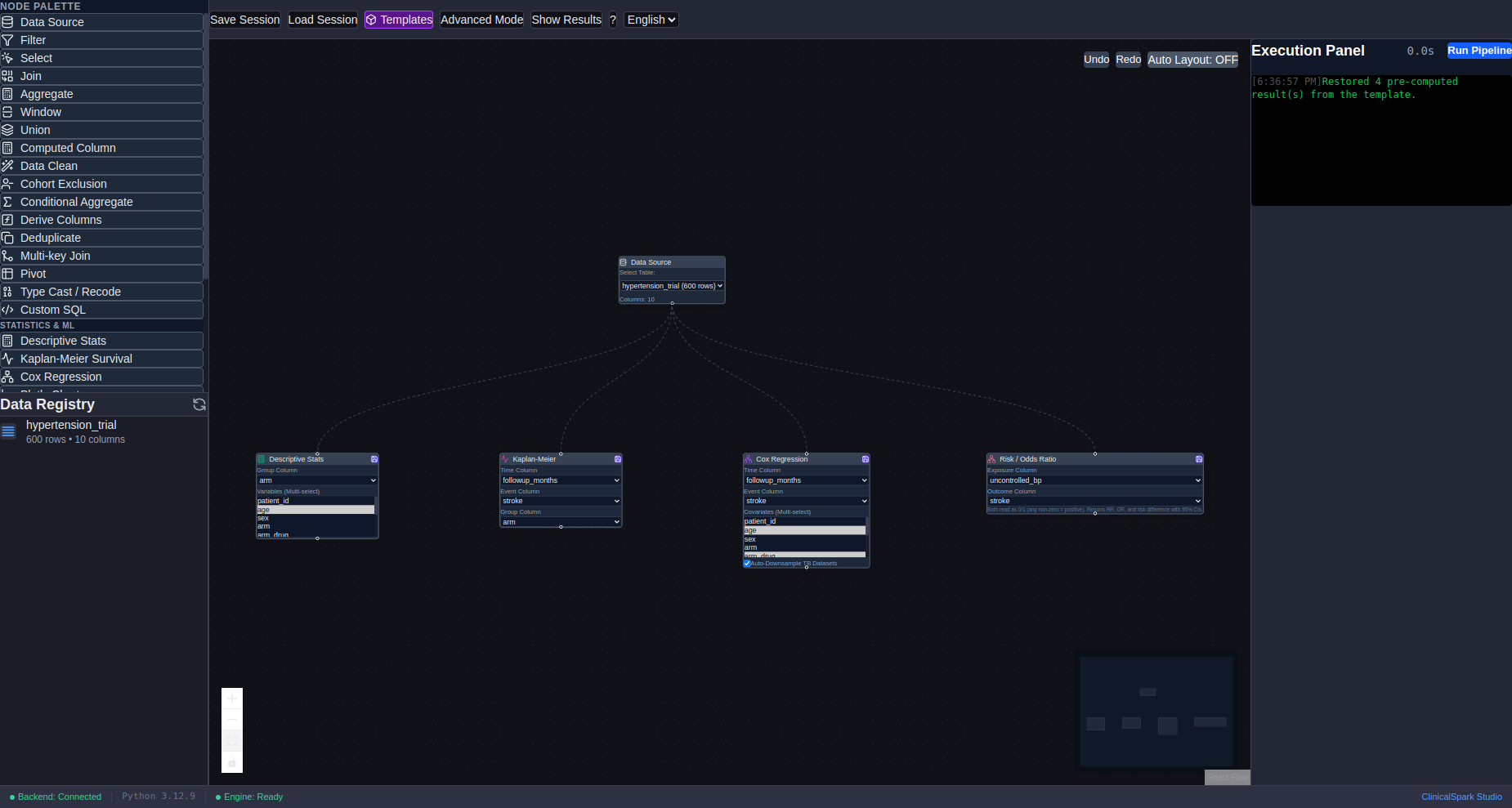
The screenshots and sample output below were captured before the CohortDAG rename, from ClinicalSpark Studio builds up to rc15. They illustrate the workflow, not the current rc20 interface or platform setup dialogs.
What it is
A desktop visual workflow editor for clinical big-data analysis on Apache Spark. Researchers connect data sources, filters, joins and statistics nodes on a canvas; the compiler emits Spark SQL, the hybrid statistics engine produces Table 1, Kaplan-Meier curves, Cox models and epidemiological measures, and everything saves into a portable .csp session that reopens with results intact.
How it works
The agent authors a .csp graph of nodes, edges and analysis settings. CohortDAG's compiler and statistics engines execute it using fixed application code, and the app carries no language model of its own. This makes execution inspectable and repeatable; it does not validate the agent's choice of variables, SQL expressions, assumptions or interpretation. Researchers must still review the analysis and its results.
flowchart LR
  A["Import data<br/>CSV, Excel, SAS, SPSS"] --> B["Register tables"]
  B --> C["Build the pipeline on the canvas:<br/>sources, filters, joins, windows,<br/>cohort exclusions, statistics<br/>(live Spark SQL preview)"]
  C --> D["Validate and compile<br/>to deterministic Spark SQL"]
  D --> E["Run"]
  E --> F[("export_data checkpoints<br/>parquet, reused by fingerprint")]
  F --> G["Results: Table 1, Kaplan-Meier,<br/>Cox, incidence and risk ratios, charts"]
G --> H["Save a portable .csp<br/>with results embedded"]flowchart TD
subgraph AG["AI agent — Claude Code, Codex or Antigravity"]
direction TB
R["Read the node vocabulary<br/>(list_node_types)"] --> S["Read the live session, read-only<br/>(get_session_state)"]
S --> W["Author a .csp:<br/>nodes, settings and edges<br/>(review SQL and assumptions)"]
end
U["User instruction"] --> R
W --> V["Validate (validate_pipeline)"]
V --> P["Compile to deterministic Spark SQL"]
P --> RUN["Run (run_pipeline / run_statistics)"]
RUN --> CK[("Checkpoints<br/>parquet, Merkle-reused")]
CK --> AU["Reference exact audit:<br/>verify_template.py<br/>exceptAll both ways = 0"]
AU --> Q{"PASS?"}
Q -- "Yes" --> FR["Freeze verified results:<br/>embed payloads into the .csp"]
Q -- "No / unresolved" --> ST["STOP, keep artifacts,<br/>diagnose cause, draft a retry"]
ST --> R
FR --> HB["Hand back to the human:<br/>launch_app / push_dag (consent-gated)"]Verified diagnosis & retry examples
- An all-node execute-and-audit surfaced 36 real defects the passing test suite never caught — for example a Kaplan-Meier median whose confidence bounds were swapped. Those became the pipeline validator's required-config checks.
- Checkpoint reuse is a Merkle chain: editing an upstream node invalidates every downstream checkpoint, so a stale result is never served.
- The statistics-engine version is folded into each result fingerprint, so fixing the stats code invalidates cached results the fingerprint could not otherwise see.
- A timeout means a dead backend, never a bound on real work: Spark-bound calls get a longer budget, and previews never full-scan a lazy view.
- A structured error payload that still exited zero was poisoning agent loops; the CLI now exits non-zero on error payloads.
- On Windows a bare python3 resolved to the Microsoft Store stub and killed every Spark worker, so the driver interpreter is now pinned.
- A deliberately-unfixed scientific caveat, recorded not hidden: one Cox covariate uses a lexicographic-minimum height rather than the earliest exam.
Verified 2026-09-17 against the CohortDAG 0.1.0-rc16 source: the shared headless run-and-compile layer, the Python and Apache Spark backend, the read-only agent bridge, and the frozen authoritative audits (verify_template.py --all, byte-perfect against the notebook oracle on the 185,068-patient tooth-fracture cohort).
Let your AI agent install it
Your agent downloads the software, registers the MCP server and skill into itself, and runs the self-check — then tells you what it found. You approve the run before anything executes.
The Deploy button opens Claude Code with the instruction pre-filled (you press Enter to run it). It needs Claude Code’s desktop link handler — if the button does nothing, use Copy setup prompt and paste it into Claude Code, Codex, Antigravity, Gemini CLI, or any agent with a chat box.
Already installed? Register the server
These add the MCP server to a client that already has the tool on the machine. They do not install the software itself.
cohortdag agent install --target claude-codecohortdag agent install --target codexcohortdag agent install --target antigravitycohortdag doctorInstall for your agent
Follow the steps for your client, then run the self-check.
- 1.
Hook CohortDAG into Claude Code
Run this once after installing the app. It registers the cohortdag MCP server and installs the pipeline-authoring skill.
bashcohortdag agent install --target claude-code - 2.
Let the agent verify the environment
Diagnoses Node, Python, pyspark and the JVM, and prints exact fixes for anything missing.
bashcohortdag doctor - 3.
Ask for an analysis in plain language
The agent authors the .csp pipeline, validates, compiles and runs it, then opens the session for your review.
prompt"Build a survival analysis comparing stroke-free survival by treatment arm in my trial table, adjusted for age, SBP and diabetes."
cohortdag agent install --target antigravity does the same one-command hookup for Google Antigravity. The commands above assume the desktop app is installed — request the installer from the lab below.
Environment & self-check
Prerequisites
- Windows x64 for the qualified rc20 Windows build
- macOS 15 or later on Apple Silicon for the qualified rc20 Mac build; Intel Macs are unsupported
- x64 Linux; rc20 qualified on Ubuntu 22.04; Debian and Ubuntu support assisted repair through apt-get and desktop authorization
- Internet access during first-run runtime setup
- Approximately 2 GB of free space for the isolated analysis environment
Environment variables
| Variable | Purpose |
|---|---|
COHORTDAG_MASTERoptional | Spark deployment: local[N] (default local[*]), spark://host:port for a standalone cluster, or sc://host:port for Spark Connect. |
COHORTDAG_DATA_ROOToptional | Directory holding your source parquet tables — only needed to run pipelines that read them. |
COHORTDAG_DRIVER_MEMORYoptional | Overrides the local-mode driver heap (default: 25% of RAM, clamped to 4–16 GB). |
The self-check your agent runs first
cohortdag doctor ✓ Node.js: v22.22.3 (running this CLI)
✓ Python: Python 3.12.9 (python3)
✓ Java (JVM): openjdk version "11.0.31" 2026-04-21
✓ pyspark: 3.5.5
✓ backend (server.py): …/ClinicalSparkStudio/src/python/server.py
! data root: $COHORTDAG_DATA_ROOT not set
fix: Set $COHORTDAG_DATA_ROOT to the directory holding your
source parquet tables (only needed to run pipelines that read them).
Environment OK — the CohortDAG backend can run.Illustrative output
One sentence in, a full trial analysis out
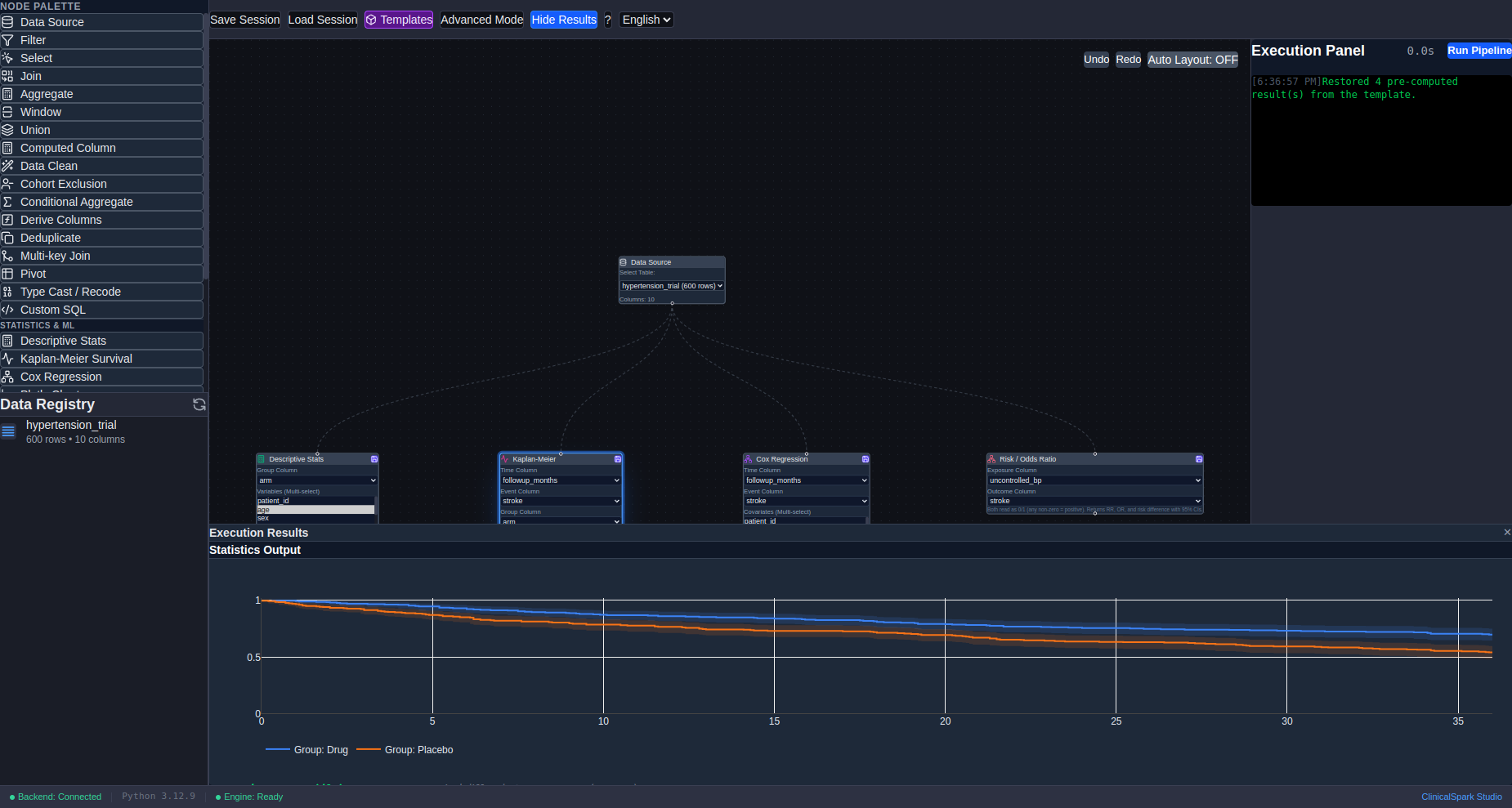
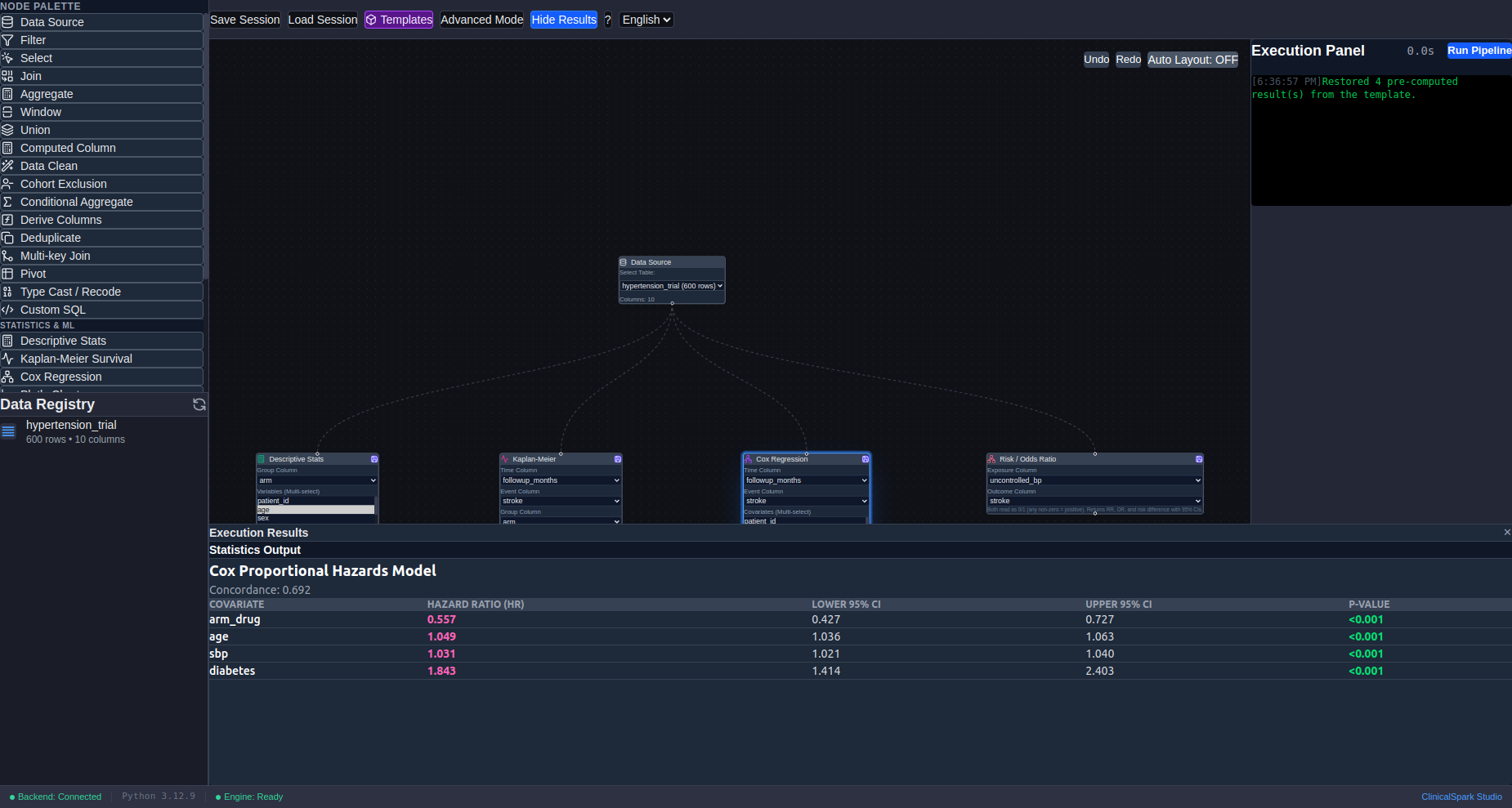
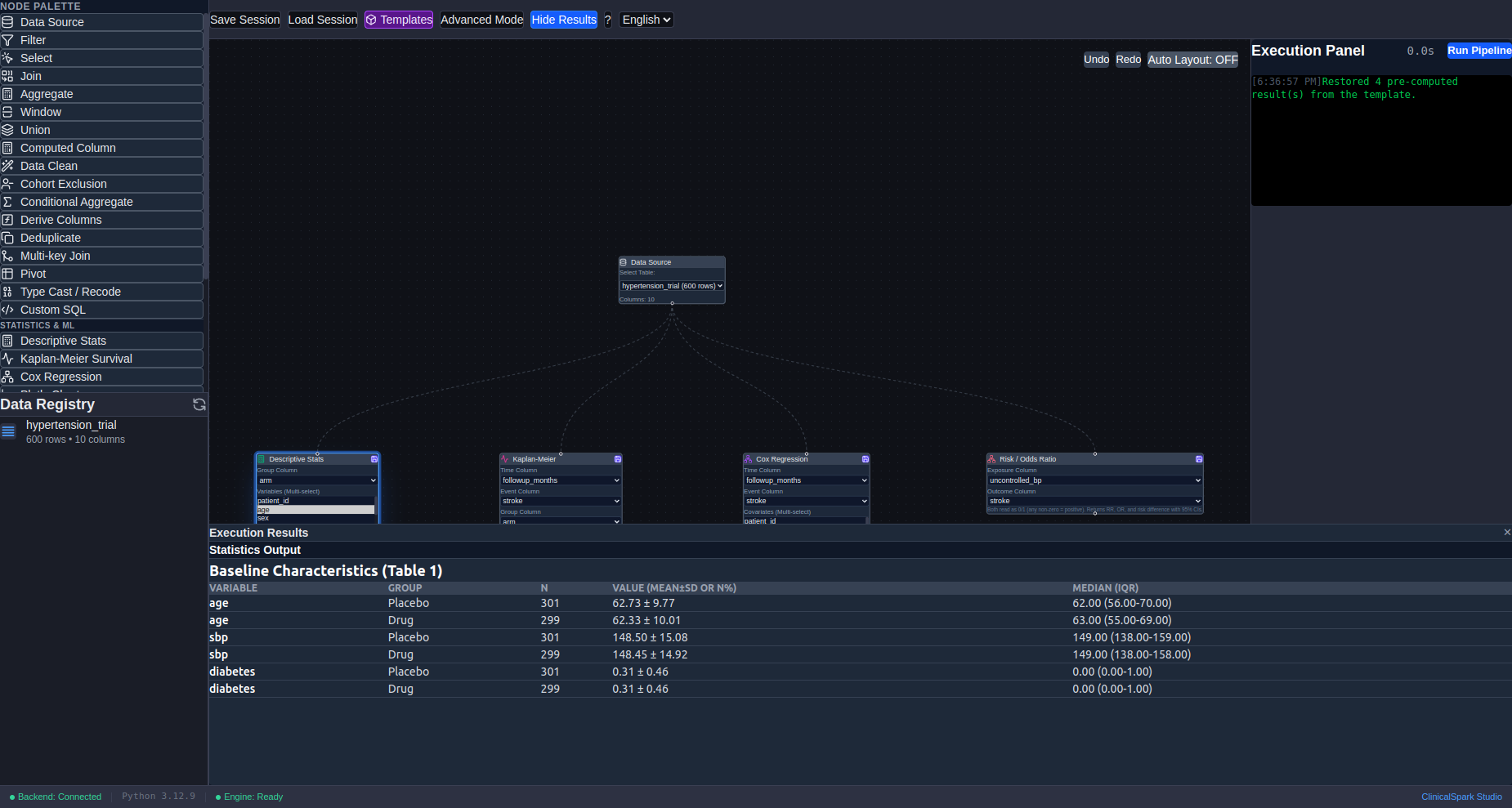
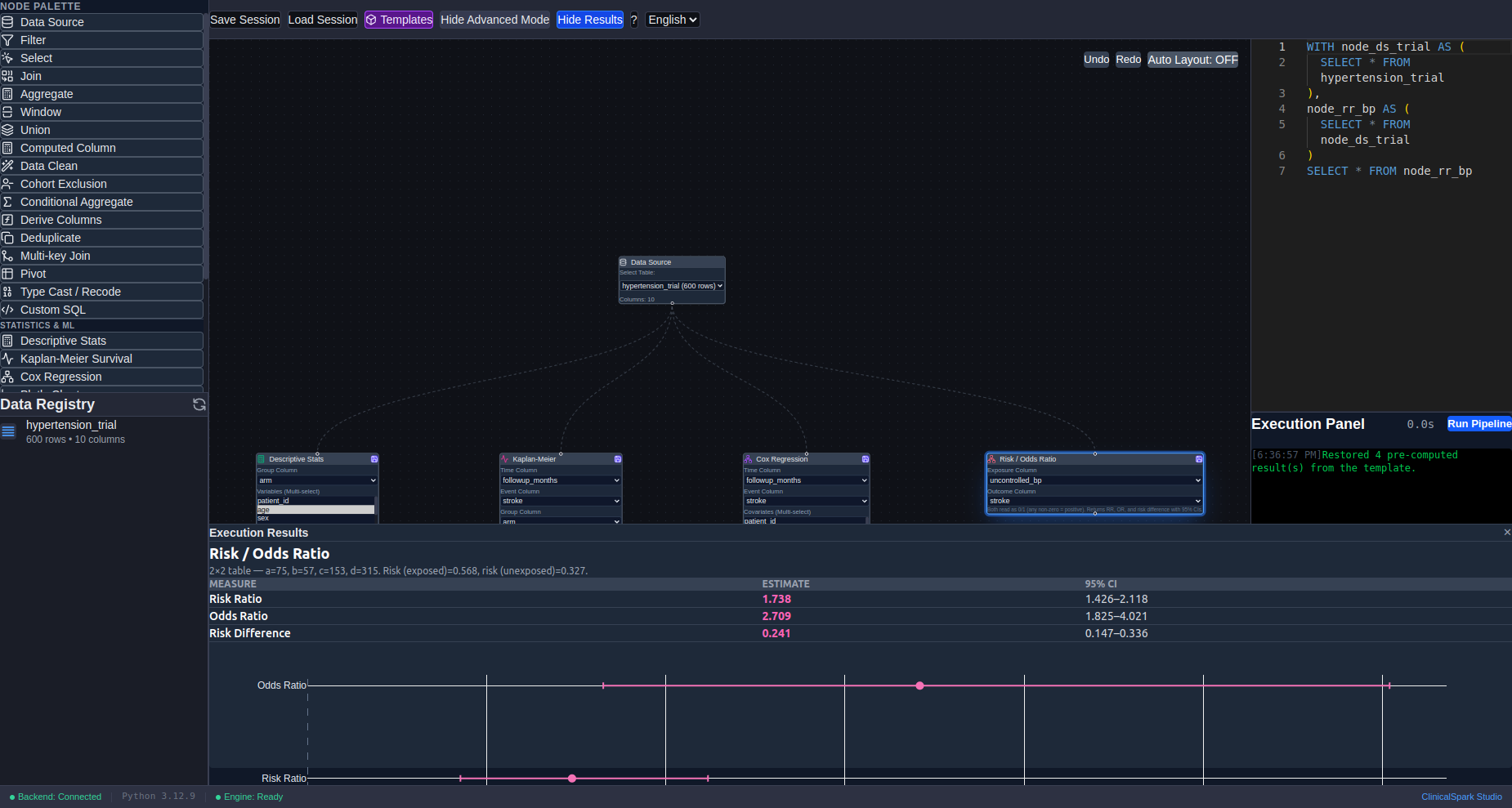
The product's worked demo asks an agent for an antihypertensive-trial analysis in one sentence. The agent authors the pipeline — Table 1, Kaplan-Meier by arm, an adjusted Cox model and a risk ratio — validates and runs it headlessly, and hands back a .csp session that opens with every result already rendered. The demo dataset is seeded and the statistics are deterministic, so these numbers reproduce exactly.
- Adjusted treatment effect
- HR 0.56
- 95% CI 0.43–0.73, Cox PH
- Survival difference
- log-rank p < 0.001
- drug vs placebo arms
- Uncontrolled BP → stroke
- RR 1.74
- 95% CI 1.43–2.12
- Cohort
- 600 patients
- seeded synthetic trial data
Measured — from the product's demo/hypertension-trial.csp session, generated by a deterministic seed and shipped pre-run with every install.
Capabilities
Visual DAG → Spark SQL compiler
27 node types — sources, filters, joins, windows, pivots, cohort exclusions — compile deterministically to Spark SQL you can read in Advanced Mode. No black box between the picture and the query.
Clinical statistics engine
Kaplan-Meier with Greenwood CIs and log-rank, Cox proportional hazards, grouped Table 1, incidence rates, risk/odds ratios, SIR modeling, Bayesian comparisons and causal-DAG confounder analysis.
A full contract for AI agents
A cohortdag CLI (doctor, validate, compile, run, convert…), an 18-tool MCP server, and a packaged SKILL.md. One command hooks it into Claude Code, Codex or Google Antigravity.
Human-auditable by design
Agents hand back a portable .csp session that opens in the GUI with every result rendered. Agents can push nodes onto your live canvas — only after you click Accept in a consent dialog.
Checkpoints and honest caching
Export nodes materialize parquet checkpoints; fingerprint chains reuse them only while every upstream node is unchanged. Previews stream as Arrow IPC, never full-table collects.
Notebook & SQL migration
cohortdag convert lifts legacy MySQL workflow scripts and PySpark notebooks into pipelines. Provable shapes become native nodes; anything unprovable stays Custom SQL so results never silently change.
In the studio
Know before you ask for it
- Pre-release: use the platform-specific version and publication date shown beside each live download.
- The Windows rc20 installer is not Authenticode signed; verify its displayed SHA-256 before accepting Windows SmartScreen's More info → Run anyway flow.
- The macOS rc20 DMG and ZIP are unsigned and unnotarized Apple Silicon previews; verify SHA-256 and use Privacy & Security → Open Anyway if you trust the build.
- The Linux rc20 DEB and AppImage are unsigned x64 previews; verify the displayed SHA-256 before installing or running them.
- Java, Python and pyspark are not embedded in the installer; first-run setup creates an isolated user environment and obtains required packages with consent.
- Local mode is a single JVM — very large unfiltered joins need the checkpoint discipline the skill teaches, or a real Spark cluster.
- Agent access to a live session is metadata-only, and pushing nodes onto your canvas always requires a human Accept.
Apache®, Apache Spark, Spark, and the Spark logo are either registered trademarks or trademarks of the Apache Software Foundation in the United States and/or other countries. No endorsement by The Apache Software Foundation is implied by the use of these marks. Learn more at Apache Spark.
Releases & access
View changelog →- Available downloads
- 0.1.0-rc20 Windows x64 installer and 0.1.0-rc20 Linux x64 DEB/AppImage (qualified on Ubuntu 22.04); 0.1.0-rc20 macOS 15+ Apple Silicon DMG/ZIP. All are unsigned. Intel Macs are unsupported. The download panel checks current availability for each platform.
- Who can download
- Sign in with an internal, Pro or Enterprise workspace to download. A free account does not include access; contact support to request it.
- License by edition
- Pre-release software terms and bundled third-party notices apply. See the licensing notice for the preserved prior grants and current scope.
- Before you update
- Use the entitled download panel for updates. Save and back up your .csp sessions before upgrading. Keep the previous installer for recovery; automatic background updates are not offered by this preview.
Publication records checked
Read edition license / terms